Duplicate Namespace Issue with Schema Validation in Pipeline Components

Today I was tasked with enabling XML schema validation for an existing WCF receive location in BizTalk. The client was already using the out-of-the-box XmlReceive pipeline, so I figured this would be short work, finished by lunchtime after all the regression tests had been run. Little did I suspect that I would run into a snag that would enlighten me to a new BizTalk “feature”.

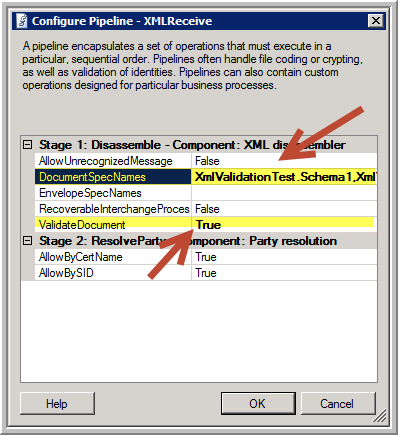
Because of a compressed time schedule, we wanted to avoid having to add a new custom pipeline to the solution, even one as simple as containing a standard XmlValidator component. So instead, I opted to use port-based configuration by enabling validation within the XmlDissembler component in the existing XmlReceive pipeline. Of course, this does require specifying the list of specific schemas in the DocumentSpecNames property on the port instance:
SchemaValidation-Settings

The trick here, of course, is to ensure you get these specifications correct, as they need to be fully qualified assembly (FQN) references. Moreover, if you are expecting multiple message types, you need to separate the entries with a pipeline (“|”) delimiter, something not so obvious if you don’t read the Microsoft documentation. Even less obvious is how to deal with multipart schemas that contain multiple root nodes (at least this blog post sheds some light there).
Read more of this post

GOTCHA: Changing the Namespace on an Envelope Schema

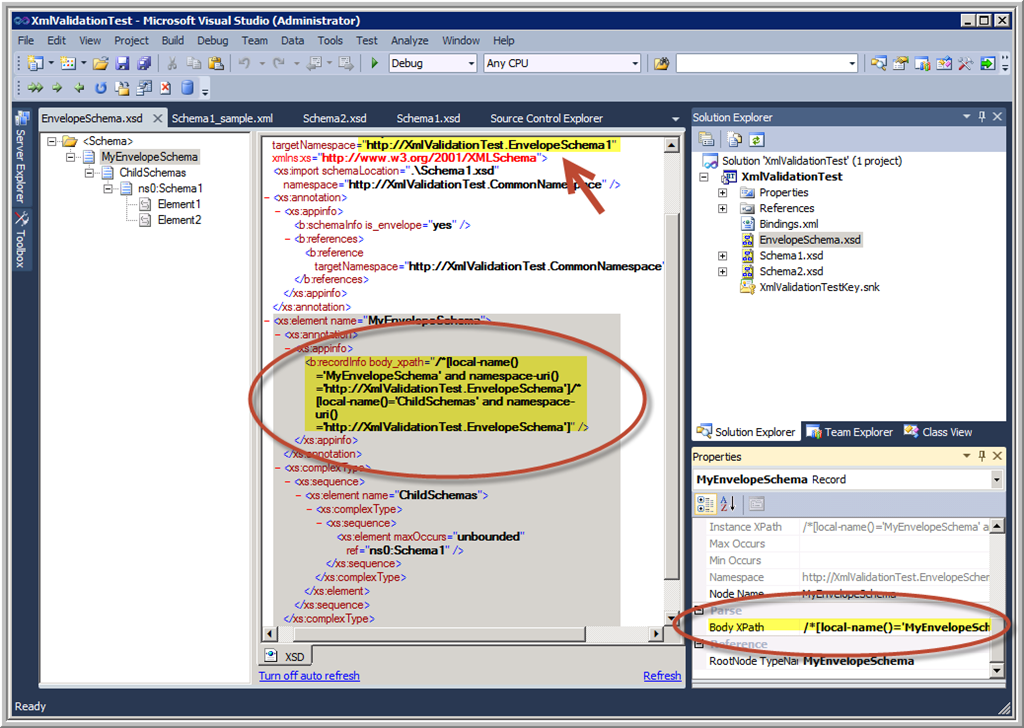
Today I had to change the target namespace for an envelope schema to resolve a conflict that caused XML validation issues in the pipeline. I also had a few other changes to make and for various reasons I did not use the BizTalk Schema Editor tool, but instead opened the schema in the standard Visual Studio XML(Text) Editor mode.

After having dutifully made the change, tested all the maps, ensured the project compiled properly, and successfully run all the unit tests, I deployed the solution.

However, the first integration test failed because on receipt of the message with a pipeline error similar to this one:

There was a failure executing the receive pipeline: “Microsoft.BizTalk.DefaultPipelines.XMLReceive, Microsoft.BizTalk.DefaultPipelines, Version=3.0.1.0, Culture=neutral, PublicKeyToken=31bf3856ad364e35” Source: “XML disassembler” Receive Port: “XmlValidationReceivePort” URI: “C:\BizTalk\Folders\XML_VAL_IN\*.xml” Reason: This Disassembler cannot retrieve body nodes using this XPath: “/*[local-name()=’MyEnvelopeSchema’ and namespace-uri()=’http://XmlValidationTest.EnvelopeSchema’%5D/*%5Blocal-name()=’ChildSchemas’ and namespace-uri()=’http://XmlValidationTest.EnvelopeSchema’%5D”.
/*[local-name()=’MyEnvelopeSchema’ and namespace-uri()=’http://XmlValidationTest.EnvelopeSchema’%5D/*%5Blocal-name()=’ChildSchemas’ and namespace-uri()=’http://XmlValidationTest.EnvelopeSchema’%5D

Only then did I realise that in updating the target namespace of the schema, I forgot to update the BodyXPath value – which of course has the namespace all through it!

EnvelopeSchema-BodyXPath

Solution is to refresh the BodyXPath property by clicking the ellipses (…) button on the property grid and reselecting the node just above the repeating node you want to debatch:

EnvelopeSchema-Debatch

The good news is that when you use the Schema Editor to change the target namespace, this synchronisation is taken care of for you automatically. And if fact, you cannot change the BodyXPath property by typing in the property grid – you have to open the Body XPath dialog as shown above.

Moral of the story is: beware of circumventing the built-in editors and tools unless you are really, really careful. The tools are usually designed to help keep you out of trouble. 😉

Message Tracking in Windows Azure BizTalk Services

Tonight I was presenting on Windows  Azure BizTalk Services (WABS) to the Brisbane Azure User Group, and someone asked me where you configure message tracking. It was one of those embarrassing moments where you know you saw the feature somewhere, but can’t remember exactly where… hence this blog post.

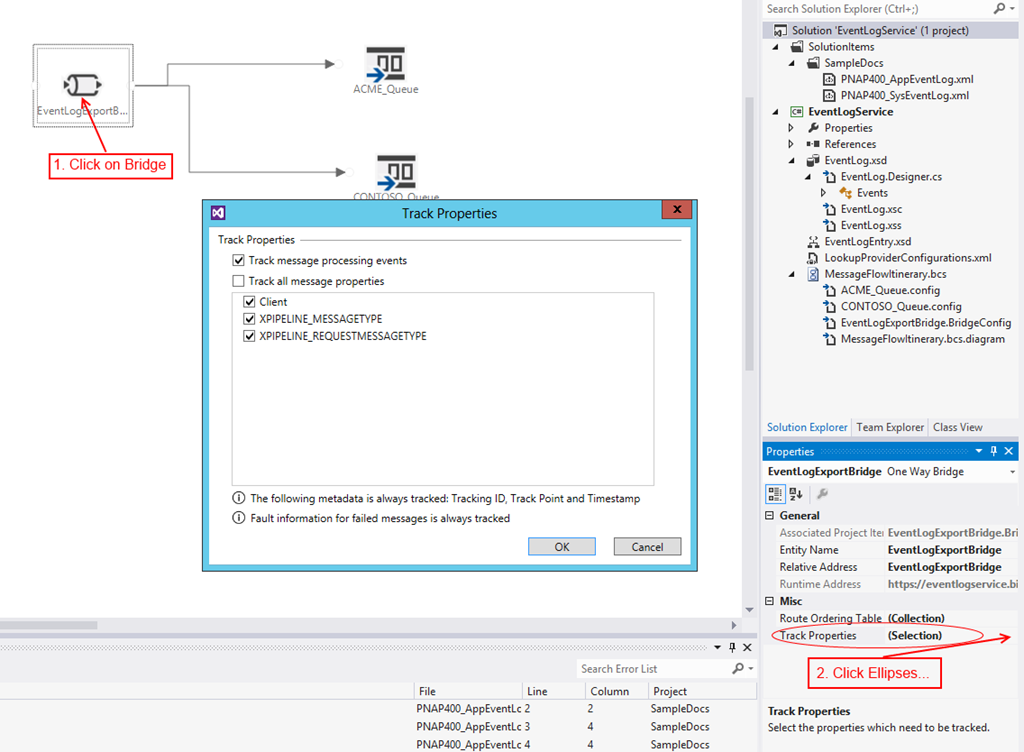
All messages go through a bridge in WABS, which is created on a design surface in Visual Studio (assuming you have installed the Windows Azure BizTalk Services SDK, that is). It is a property on this bridge element which eluded me tonight, although I don’t know how since it is pretty clearly marked:

TrackProperties_markup

Simply select the bridge element, then click the ellipses (…) button next to the Track Properties property to open the (…. you guessed it!….) Track Properties dialog box. There you can select any properties that you have promoted in an Enrich stage of the pipeline, as well as the default XPIPELINE_MESSAGETYPE and XPIPELINE_REQUESTMESSAGETYPE properties.

It should be noted that certain properties are tracked by default, regardless of whether you select anything here at all:

  • pipeline state
  • stage state
  • whether the route destinations are successfully ascertained
  • the activity state for any message processing faults

You then have the ability to view & search on tracked message data in the BizTalk Services Portal:

TrackingPortal

Note that to get to this portal, you need to:

  1. Log into the Azure Management Portal
  2. Click on BizTalk Services on the left (just below Service Bus)
  3. Click on the Manage button at the bottom of the screen

(The first time you access this portal, you may need to enter the Issuer Name & Issuer Key with which you deployed your application, from the ACS namespace you created to associate with the BizTalk Service.)

More information about tracking can be found here on MSDN.

A Cloudy Day for BizTalk (…but what a sunny forecast!)

Recently, Microsoft announced the release of a plethora of new features in Windows Azure, not the least of which was the preview version of BizTalk Services. A re-vamped version of the former Azure Service Bus EAI/EDI Labs which was released last year and taken down earlier this year, Windows Azure BizTalk Services boasts Business-to-Business (B2B) and Enterprise Application Integration (EAI) capabilities for cloud and hybrid integration solutions, including:

  • Built-in support for managing EDI relationships between partners
  • EAI bridges with on-premises assets (including built-in support for integration with SAP, SQL Server, Oracle and Siebel)
  • Optional integration between Windows Azure BizTalk Services and on-premises BizTalk Server deployments
    Like most Azure offerings, BizTalk Services runs on a secure, dedicated per tenant environment that can be provisioned on demand within minutes.  It does not require any upfront license, and supports a pay only for what you use billing model.

Learn more about how to setup and start using the Windows Azure BizTalk Services preview.

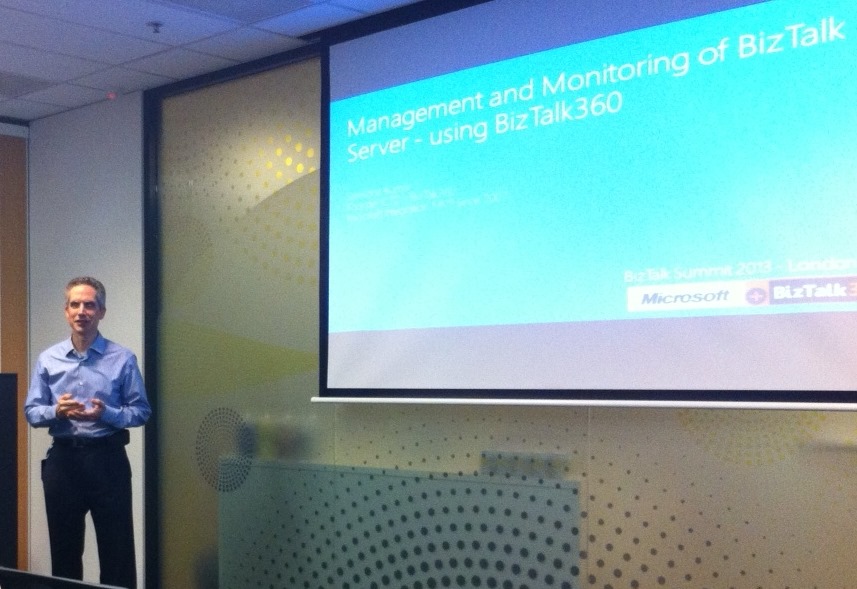
BizTalk360 Presentation to Brisbane User Group

Tonight I set out to present a 45-minute discussion and demonstration of BizTalk360 to the Brisbane BizTalk User Group. An hour and a half later, I was still answering questions and displaying in-depth features of the product! We’re a pretty small & intimate group, so there was plenty of opportunity for discussion and catering for specific requests (“Can I see how … works?”), which for me as a presenter is awesome. I love interaction because you know you are really reaching your audience (small or large) and addressing their interests & concerns.

BTS360The truth is, they were truly impressed with the power and flexibility of the product, despite the limited scenarios that I was able to present to them. Saravana and his team have really hit the mark with this release, addressing a critical void in the BizTalk operational support area. Looking forward to Version 7.0!

Only downside was that I barely had time left to present my second session for the night, new features of BizTalk 2013! Oh well, I don’t think Microsoft needs too much help in selling that product anyway! Winking smile

Next BrizTalk Meeting: BizTalk 2013 & BizTalk360 Demos!

I’m really looking forward to presenting a double-header at our next Brisbane BizTalk User Group meeting on Wednesday:

What’s New in BizTalk Server 2013

Finally released to manufacturing, this long awaited edition hosts a variety of new features that make integrating your on-premises system with the cloud so much easier. The new REST and Azure Service Bus adapters provide quick & simple connectivity for building powerful, flexible and highly scalable hybrid solutions with BizTalk & Azure.

We’ll see an example of both in action during this part of the presentation.

Monitoring with BizTalk360

Now in Version 6.0, Saravana Kumar and his team have released the best-ever edition of BizTalk360, an easy to install web-based application that helps manage the complexity of supporting your BizTalk environments. In addition to the standard features of monitoring, alerting, administrating and auditing, the new capabilities of this release include:

  • Search & Action on Artefacts (Receive locations, send ports, applications etc.)
  • ESB Exception Management Portal
  • Custom SQL Query Complete Rewrite
  • Database Query Monitoring
  • SQL Agent Job Outcome Monitoring
  • Threshold Monitoring Window
  • Scheduled Monitoring Downtime
  • Support for SSL

I’ll present a demo of an active installation so you can witness first-hand the simplicity with which this awesome tool provides value!

If you’re in the Brisbane area, drop by Microsoft at 400 George St, Lvl 28 at 5:30pm on Wednesday, 29th May for some pizza and a great session! All i ask is that you register first so that I know how many pizzas to order!

Richard Seroter in Australia!!

Richard SeroterMexia Consulting is hosting workshops in Brisbane and Melbourne led by world-renowned cloud architect and blogger Richard Seroter!

Entitled, “Designing Hybrid & Cloud Integration Solutions with Windows Azure”, this two-day event will focus on designing hybrid & cloud solution architectures with Microsoft technologies such as Windows Azure.

Specifically targeted for Solution Architects, Integration Architects and experienced Microsoft development teams, Richard (assisted by Mexia’s expert integration consultants) will cover much of the knowledge you need when designing complex integration platforms for the modern enterprise.

Particularly, this event will focus on the full range of Microsoft technologies such as Windows Azure and BizTalk Server that can be deployed as part of modern on-premises, hybrid cloud and pure cloud integration solutions. By attending this event, you will understand the capabilities and benefits of each Microsoft technology, and which technologies are most appropriate for particular purposes and design goals.

To register:

If you’re a Solution Architect, Integration Architect or senior developer with a passion for integration, this event is not to be missed!

BizTalk 2013 RTM VM Now Available in Window Azure Gallery

With Scott Guthrie’s announcement the other day concerning General Availability (GA) of Windows Azure Infrastructure Services, we now have available a selection of new BizTalk Server 2013 RTM virtual machine images in the Windows Azure Gallery:

  • BizTalk Server 2013 Enterprise
  • BizTalk Server 2013 Standard
  • BizTalk Server 2013 Evaluation

The Evaluation image will help you get started with the evaluation bits of BizTalk Server 2013 and SQL Server 2012.

This IaaS availability is a key aspect of the BizTalk Server 2013 release. Now you can quickly and easily spin up pre-configured BizTalk servers in the cloud without relying on the time, expense and other overheads of on-premises acquisitions. Imagine being able to provision an entire testing environment in minutes/hours instead of days/weeks/months!  And the best part is that, like all Azure services, you only pay for what you use. 🙂

The pricing details for these VMs can be found here.  Remember that there is also a (very small) storage cost for the disk images as well.

More information can be found on the BizTalk Server Team Blog.

BizTalk Saturday Event Completed

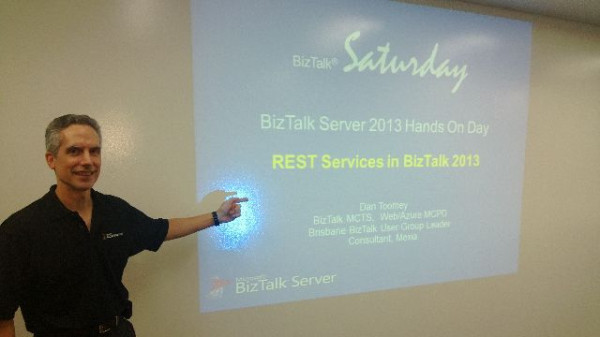
Just finished our BizTalk 2013 Hands On Day event in Brisbane, presenting with Bill Chesnut to a captivated audience about the new features and abilities to integrate with Azure. This is the last event for this round… but stay tuned for future events.

Presenting at BizTalk Saturday

Many thanks to Bill for his tireless effort at organising this and giving up most weekends, traveling all over Australia & New Zealand! Also thanks to Dean Robertson for the pic.

Using BizTalk xpath() Function to Retrieve Optional Nodes

I often suffer a bit of trepidation when trying to retrieve values for optional XML nodes using the built-in xpath() function in an orchestration, as I wonder if it will result in an exception of some kind if the node isn’t found in the message.  This concern is heightened by reading Microsoft’s own documentation of the xpath function on MSDN:

The engine is not schema-aware, so you can only read values from or write values to a node that exists in the containing message (the complete path must exist), or the engine will raise an exception. This is true even if you supply a default value.

The conclusion from this is that if the node doesn’t exist in the message instance, you’ll get a runtime error trying to read from it using xpath(), right?

Wrong! In fact, as Leonid Ganeline proved in an older blog post, you will either get an empty string or “null”, depending on whether you wrap the XPATH expression in a string() function or not:

John Glisson - Geek of the Cloth

Thoughts on integration, technology and what-not...

Prashant BizTalk And Azure Integration Blogs

My Integration Experiences - BizTalk And Azure Integration

The CRUCIBLE

THINK: It's not illegal....yet.....

Architecture for cloud and integration

Abdul Rafay's experiences with software architecture, integration, cloud and things around it.

BizTalk musings

Issues, patterns and useful tips for BizTalk development

EAI Guy.net

Enterprise Applicaiton Integration and SOA 2.0

Connected Pawns

Mainly BizTalk & Little Chess

Adventures inside the Message Box

BizTalk, Azure, and other tools in the Microsoft stack - Johann Cooper

Biz(Talk)2

Talk, talk and more talk about BizTalk

Richard Seroter's Architecture Musings

Blog Featuring Links, Code, Thoughts, and Experiences with Software, AI, and Cloud Services

Sandro Pereira BizTalk Blog

My notes about BizTalk Server 2004, 2006, 2006 R2, 2009, 2010, 2013 and now also Windows Azure BizTalk Services.

Mind Over Messaging

Musings on BizTalk, Azure, and Enterprise Integration

WordPress.com News

The latest news on WordPress.com and the WordPress community.