Testing for Empty/Nil/Missing Source Nodes in BizTalk Maps

Re-posted from another blog – original publish date 27 Aug 2012

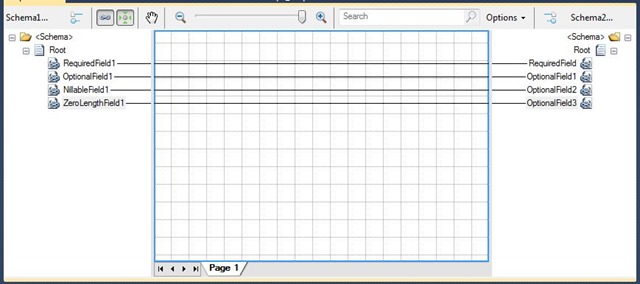
Scenario: You are mapping an optional node in your source schema to an optional node in your target schema. But… the target schema has stricter validation rules and cannot accept empty or “nil” nodes, whereas the source schema can.

By default, if the source node doesn’t exist, it won’t be output in your target. No problems there. But… what if the source node is empty or null?

Let’s look at this mapping example:

BadMap

Read more of this post

MABS: Lessons in Configuring a (Service Bus) Queue Source

An excellent tip by Mark Brimble on how to avoid this trap when integrating Service Bus with MABS.

mbrimble's avatarConnected Pawns

This weekend I keep on getting this error when I tried to deploy a Microsoft Azure BizTalk Services solution;

“COQueueSource deployment failed at ‘https://biztalksoa.biztalk.windows.net/default/COXmlOneWayBridge/sources/COQueueSource’.
Failed to connect to the ServiceBus using specified configuration.”

image

I also observed this error in the MABS tracking portal.

image

This error had me stumped for awhile;

  1. This had worked months ago when I had followed a post by Steef-Jan Wiggers. I had followed his pattern to the letter.
  2. I could use the same connection string in the Service Bus Explorer to connect to the same queue without issue.

The default authentication mechanism for Service Bus namespace has changed from ACS to SAS since I had last tried to use a Queue source and I wondered if this was the cause. I had created the service bus using powershell commands to make sure that the queue source could use ACS in its connection string…

View original post 143 more words

Logical Functoids Cannot Connect to XML Attribute Nodes

After working with BizTalk Server for over ten years, I was amazed to discover only today that the BizTalk 2010 Mapper does not allow you to connect a logical functoid to an XML attribute node!

Logical functoids are “special” in that they don’t output values when connected to a node in the target schema. Rather, the Boolean value that they do emit is often used as a conditional flag for determining the connected node’s appearance in the result. If a logical functoid connected to a record or an element evaluates to “false”, then the record/element will not be present in the output.

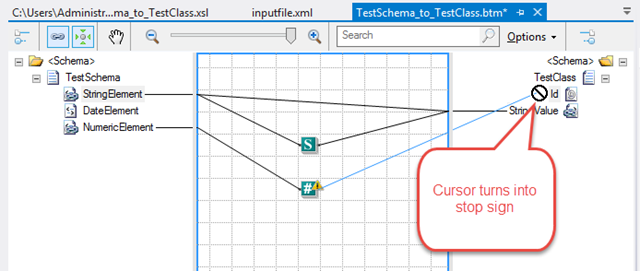
The question is… why doesn’t this work for attribute nodes as well??  Try to connect a logical functoid to one and the cursor turns into the dreaded “No you don’t!!” symbol, as shown in this screenshot:

MapToAttribute_NOT_v2

Read more of this post

Using BTDF to Deploy Pure WCF Services

The BizTalk Deployment Framework (BTDF) is widely used as a tool for managing the complex deployment requirements for BizTalk Server integration solutions. With each iteration, it gets better & better. The latest version (still in Beta) now supports BizTalk Server 2013 R2.

Of course at Mexia we use this tool quite regularly for our clients, enjoying the simplicity it affords in automated deployment and management of environment-specific configuration. However, the ESB that we often provide our customers includes more than just BizTalk applications; it includes some services implemented in pure WCF. Although these services do utilise BAM for tracking and SSO for configuration management, those features do not require the empty BizTalk application that is generated from using the BTDF.

After consultation with BTDF author Thomas Abraham and some helpful tips on this thread, I spent some time putting together a BTDF project file that would deploy just the bits that are needed for WCF – and nothing more. It has been very successful so far, providing for a consistent build definition and deployment process across the entire ESB platform.  I’d like to share it with you here.

But before we go into the details, there are a few things you need to be aware of regarding this solution: Read more of this post

Using AS2 Bridges in MABS (post August 2014 Update)

In my previous post about using the new EDI bridges in Microsoft Azure BizTalk Services (MABS), I promised to follow up with an example of using the AS2 bridge type – so here it is.

Applicability Statement 2 (AS2) is all about establishing security and reliability when transmitting B2B messages over HTTP/S. It provides for digital signing and encryption as well as acknowledgements via Message Disposition Notifications (MDN), which also leads to support for Non-Repudiation (NRR).

Like BizTalk Server, MABS provides support for AS2 with EDI transactions; in fact, the latest update has enhanced this experience with additional symmetric key encryptions including AES, DES3 and RC2 as well as MD5, SHA1 and SHA2 for MIC calculation. The main difference in this latest update, though, is that the AS2 bridge and the associated agreement are configured separately, just like the EDI bridges themselves now are. Understanding the sequencing of these bridges and how they connect is key, however, and may not be readily apparent from the current documentation – hence the reason for this article.

Scenario for Using AS2 Bridges

For the purposes of this post, I am going to expand on the demo used in the previous post by introducing AS2 bridges. I am not bothering to configure certificates, because this process has not changed since MABS was released, and it is well-documented on MSDN. Besides that, the focus of this article is on how the bridges connect, not so much about the implementation of encoding, etc. (But if you want to see how the certificates are used and the relationship of the public & private keys, I suggest having a look at this page which lays out the whole process in a very clear diagram.)

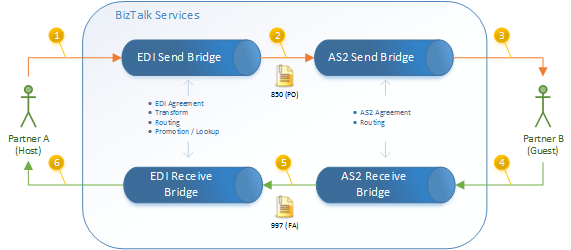
Let’s assume that Partner B requires the AS2 protocol for all B2B exchanges. The pattern in BizTalk Services therefore makes use of both EDI bridges and AS2 bridges, with separate agreements established for both:

AS2-Exchange

Read more of this post

Creating EDI Bridges in MABS (post August 2014 Update)

In my last post, I talked about the new EDI features in the August 2014 release of Microsoft Azure BizTalk Services (MABS), particularly in regards to the separation of agreements and bridges. In this article, I’m going to discuss how you actually create & invoke these new bridges – especially since the experience wasn’t quite as intuitive as I would have expected and the documentation is still a bit light.

Prior to the August update, you used to create an agreement and this would automatically generate the send & receive bridges that hosted the agreement. Now that you create these artefacts independently, you can enjoy greater flexibility and reusability – but it also entails a few extra steps and requirements in order to establish it. Let’s walkthrough the process.

1. Create the Partner Profiles

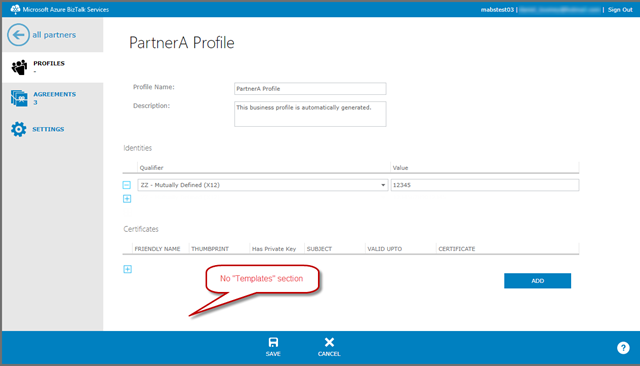
You can’t really do anything without creating these. Nothing terribly significant has changed about this process in the latest update – except that you no longer have the option of creating an agreement template within a profile.

01-PartnerProfile

For this example, I’ve created two partner profiles with their respective “ZZ” identifiers:

Partner Name Partner ID
PartnerA 12345
PartnerB 23456

Read more of this post

New EDI Features in BizTalk Services August 2014 Update

On August 12th, 2014, the BizTalk Product Team announced the release of the latest update to Microsoft Azure BizTalk Services (MABS), which includes the following enhancements:

  • Ability to configure and manage agreements and bridges separately
  • Ability to configure EDI delimiters at a Transaction Set level
  • Enhanced digest and encryption algorithms for AS2
  • Drummond Certification for AS2
  • Support for advanced XML constructs in transforms

The enhancements to the mapper and the associated SDK certainly sound exciting, but this blog post will concentrate on the new EDI features. Support for B2B applications through Electronic Document Interchange (EDI) is one of the core capabilities and selling points of MABS, so Microsoft’s attention to this area is a well-placed investment.

Read more of this post

RECAP: BizTalk Summit 2014 – Australia

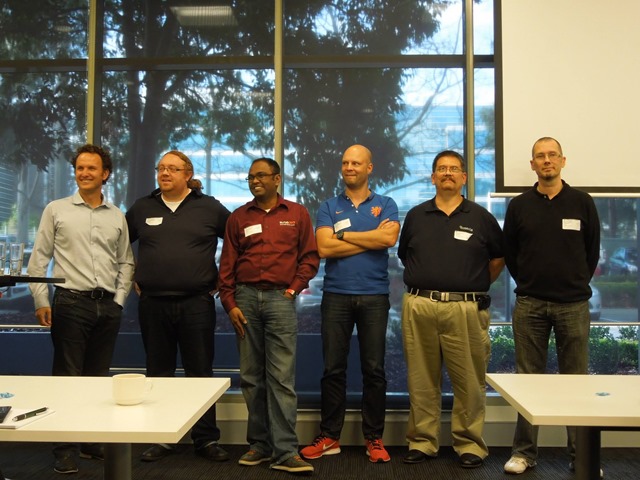
Last Friday I had the privilege of attending the final session of the inaugural BizTalk Summit in Australia, sponsored by BizTalk360 and Mexia Consulting. This was an experimental event, bringing together no fewer than six Microsoft Integration MVPs (three from Australia + three others from Europe) to deliver a whirlwind tour of consecutive one-day events across three cities (Melbourne, Sydney and Brisbane). What a great event!!

BizTalk Summit MVPs

Read more of this post

WEBCAST: Introduction to Hybrid Connections

Last week I uploaded our fifth webcast to the Brisbane BizTalk User Group YouTube channel, this one based on a presentation I recently gave to the Brisbane Azure User Group. It is an Introduction to Hybrid Connections, a new BizTalk Services technology that’s currently in Preview. In this 22 minute webcast you’ll learn how Hybrid Connections makes it easy to connect your Azure Web Sites and Mobile Services to your on-premises LOB systems – all with no changes to your corporate network.

mqdefault[1]Introduction to Hybrid Connections [https://www.youtube.com/watch?v=kEgNE_-KC90]

You can also download the slide deck from SlideShare. Most of these slides are borrowed from Santosh Chandwani, a Microsoft Azure Senior Program Manager who gave the initial presentation at Tech-Ed USA the day this went live.

Enjoy!!

Gotchas When Accessing an IaaS SQL Server in an Azure Cloud Service

It’s not that uncommon a scenario… You implement a spectacular BizTalk Server integration solution with well-designed Business Activity Monitoring, and you want to expose all that BAM goodness out through a custom-designed Web application built with HTML5, etc.

What might make this scenario slightly less common is when you’re hosting the BizTalk Server infrastructure in Azure. In this case, your custom Web application needs to be hosted within the same virtual network in order to access the BAM databases – unless of course you want to expose your SQL Server to the world by establishing a TCP endpoint on a port like 1433 (usually not a great idea).

Establishing that connectivity should be trivial – and it probably is if you get past a few potential stumbling blocks. I thought I might list some of them here in hopes that it may be helpful to others who try this.

Read more of this post

John Glisson - Geek of the Cloth

Thoughts on integration, technology and what-not...

Prashant BizTalk And Azure Integration Blogs

My Integration Experiences - BizTalk And Azure Integration

The CRUCIBLE

THINK: It's not illegal....yet.....

Architecture for cloud and integration

Abdul Rafay's experiences with software architecture, integration, cloud and things around it.

BizTalk musings

Issues, patterns and useful tips for BizTalk development

EAI Guy.net

Enterprise Applicaiton Integration and SOA 2.0

Connected Pawns

Mainly BizTalk & Little Chess

Adventures inside the Message Box

BizTalk, Azure, and other tools in the Microsoft stack - Johann Cooper

Biz(Talk)2

Talk, talk and more talk about BizTalk

Richard Seroter's Architecture Musings

Blog Featuring Links, Code, Thoughts, and Experiences with Software, AI, and Cloud Services

Sandro Pereira BizTalk Blog

My notes about BizTalk Server 2004, 2006, 2006 R2, 2009, 2010, 2013 and now also Windows Azure BizTalk Services.

Mind Over Messaging

Musings on BizTalk, Azure, and Enterprise Integration

WordPress.com News

The latest news on WordPress.com and the WordPress community.