BizTalk Integration Summit 2013 (USA)

Super excited to be attending (for the first time) the BizTalk Integration Summit in Seattle, WA next month! Not only will it be awesome to participate in the 2-day deep dive, hear what Microsoft has to say about the future of BizTalk, and participate in conversations with Microsoft leadership in BizTalk and other integration technologies, but it’s also a great opportunity to meet up with the top Integration MVPs in the world as well!

I’m especially looking forward to meeting a few of my online mentors including Sandro Pereira, Tord Glad Nordalh, Steef-Jan Wiggers, Saravana Kumar, Kent Weare and others. And of course I’ll be joined by my teammates Bill Chesnut and Dean Robertson.

Registration only opened up yesterday after a long anticipation, but places are limited and likely to disappear soon. The event takes place on 21-22 November 2013 at the Fairmont Olympic Hotel in Seattle.

A big thanks to my employer Mexia Consulting for sending me there! Smile

If you’re going, please send me a tweet and say hello so we can catch up!

WEBCAST: Integrating BizTalk 2013 with Service Bus Queues & Topics

I’ve just uploaded my latest production on the Brisbane BizTalk YouTube Channel, bringing our library up to four webcasts now! This presentation shows how easy it is to integrate BizTalk Server 2013 with Windows Azure Service Bus queues & topics, facilitating the creation of powerful hybrid applications:

Integrating BizTalk with Windows Azure Service Bus Queues & Topics[ http://youtu.be/jQefUBvc4Dk ]

You can also download the slide deck (complete with notes) from SlideShare [ http://www.slideshare.net/dtoomey/integrating-biztalk-2013-with-windows-azure-server-bus-queues-topics ]

Really loving my new RØDE Podcaster USB microphone, and also Camtasia 8.1 which makes editing these videos so easy!

WEBCAST: Schema Validation in BizTalk 2010

Just posted a new webcast on how to use out-of-the-box pipeline components to validate XML schemas for incoming messages:

http://youtu.be/4-Q9Ddy7-Tg

This is important because by default, BizTalk does not perform schema level validation on incoming messages, or even in map execution. This webcast shows two different ways that validation can be enabled, though.

Note that although BizTalk 2010 is used to demo the methodologies,  both approaches will work in all versions of BizTalk Server from 2006 onwards.

The slide deck for this webcast can be found on my SlideShare page.

Keep an eye on the Brisbane BizTalk User Group YouTube channel as more webcasts will follow!

Final Day at TechEd Australia 2013

Today was the final day of TechEd Australia, and I was privileged to attend probably the most relevant session to my chosen specialty area, apart from BizTalk Bill‘s WABS presentation yesterday. Brady Gaster from the Windows Azure SDK team gave a terrific presentation on integrating Windows Azure Websites with On-Premises Systems. billed as a discussion on “various techniques of connecting a Windows Azure Web Site to an on-premises enterprise architecture”. It certainly did not disappoint!

Brady demonstrated the use of Windows Azure Service Bus topics and relays in order to connect a website hosted  application to on-premises systems and databases by running iterative solutions based on an “Enterprise Pizza Store” concept. He used a Service Bus topic to accept orders from photo 2the website and process them, with multiple subscriptions based on the processing status. He then progressed to using Service Bus relays to expose services that perform the database operations rather than having external sources update the data directly. Finally, he included a “surprise demo” that exhibited the use of the Windows Azure SDK for Java, using a Java client to log messages.

All the demos were very smooth and impressive, and effectively demonstrated how easy it is to leverage cloud resources to implement hybrid solutions that cross organisational boundaries. All the code (excluding the “surprise”  Java demo) can be found here on GitHub, while the slides from his USA version of this presentation can be found on Channel9. He also has an extensive blog post on this. I highly recommend checking it out!

Read more of this post

Microsoft TechEd Australia 2013

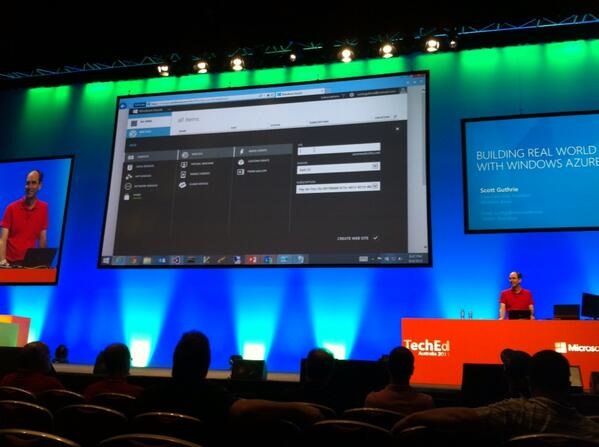
ScottGuHaving a great time at Microsoft TechEd Australia this year! Today there were some inspiring presentations, including two awesome back-to-back sessions on Building Real World Cloud Apps with Windows Azure with Scott Guthrie (yeah, he might know a thing or two about Azure! Winking smile ). The Gu talked about patterns and best practices across a variety of areas including automation, source control, fault handling, storage, logging, scalability, SLAs,  and more. As expected, his presentation and demos were highly polished and indicative of his vast experience and knowledge.BillChesnut

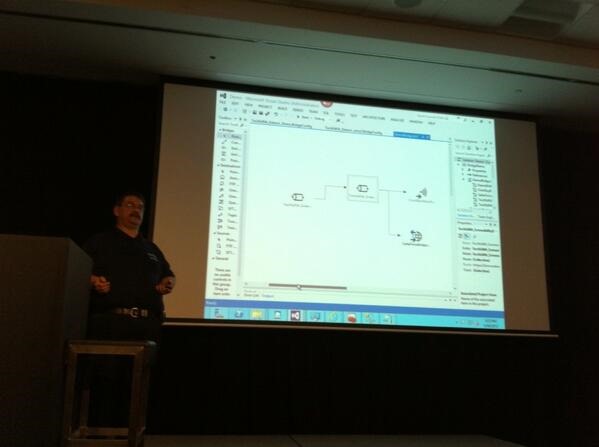
I followed this by attending an equally polished and highly informative deep-dive session into Windows Azure BizTalk Services by "BizTalk Bill" Chesnut. Bill took us through the extensibility options offered through custom code opportunities via inspectors (in between each stage of the pipeline), custom script and/or XSLT in the maps, and WCF custom behaviours in target web services. He also showed us how to scale out BizTalk Services and gave us a peek at the somewhat daunting pricing schedule.

MovieWorld001

Finally, we wrapped up the evening with the "Celebrat8" party at Movie World. There was tons of food, thrilling rides, and an impressive stunt show… but there were definitely some shady characters hanging out in the neighbourbood!

Looking forward to the lock-note tomorrow where we get to hear Scott Gu speak again, this time on the future of Azure and about "owning tomorrow".


Many thanks to Mexia Consulting for sponsoring the whole team’s attendance again this year!

Solving a Map Reference to a Deleted Schema

Recently a client got into a bit of “hot water” in their BizTalk integration environment because changes to a Common BizTalk application were not deployed prior to one of the dependent applications. This resulted in an error whenever trying to manage the environment’s applications via the BizTalk Admin Console (even when we followed the hint to refresh the console view):

Schema referenced by Map ‘Test.DependentApp.DependentSchema_to_CommonSchema’ has been deleted. The local, cached version of the BizTalk Server group configuration is out of date. You must refresh the BizTalk Server group configuration before making further changes.
(Microsoft.BizTalk.Administration.SnapIn)

The issue was that a new schema contained in the updated Common project was missing. Easy enough to understand, and the steps to resolve it would appear to be simple enough:

  1. Undeploy the dependent application
  2. Redeploy the Common application (using the new version)
  3. Redeploy the dependent application

However, the error above thwarted us at the very first step: we could not delete the dependent application either through the Admin Console or via BTSTask! Read more of this post

Removing the BOM from Outgoing BizTalk Files

Today we had an issue with sending a file to an external SFTP client – they did not like the Byte Order Mark (BOM) that was automatically pre-pended to the file by the BizTalk file adapter.

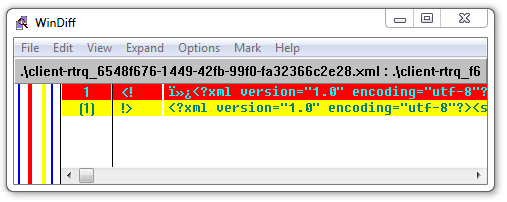
A BOM is a short set of invisible characters that is added to the beginning of a UTF-16 or UTF-8 file to indicate the endianess (or byte order) of a text stream. Among other uses, it helps consuming systems determine which encoding (UTF-8 or UTF-16) has been used in creating the stream. The BOM is optional in most cases, and you typically will not see it unless you use a special text editor that can display ISO-8859-1 or CP1252 characters (WinDiff appears to work well for this).

Here is some text that starts with a UTF-8 byte order mark (BOM); notice the three initial odd-looking characters? Represents the sequence 0xEF 0xBB 0xB in hexadecimal, or 239 187 191 in CP-1252 decimal. You won’t see these non-printable characters in most text editors.

Most modern systems can cope with the presence or non-presence of the BOM (especially in UTF-8 where the BOM is really superfluous), but this client clearly had issues with it. So it was off to Dr. Google to find the quickest solution that hopefully involved no custom code (since we are nearly in the Acceptance Testing phase).

Microsoft’s documentation partially came to the rescue, although some claims in this article do not present all the facts (at least not for BizTalk 2010). For example, the statement “If you use a PassThruReceive pipeline or a PassThruTransmit pipeline, a byte order mark is not appended to a message” is questionable, since we were in fact using the PassThruTransmit pipeline and the BOM was definitely present in the output. In addition, the article exclusively suggests creating a custom pipeline as the solution – but this is only necessary if you are not outputting XML.

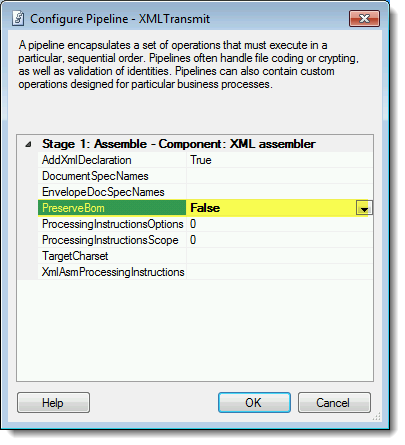
Our solution? Simply swap the PassThruTransmit pipeline for another OOTB option, the XmlTransmit pipeline. Doing this gives you access to a pipeline PreserveBOM instance property that will strip the BOM from the message for you if you change it from its default setting of “True” to “False”:

BOM_XmlTransmit

That was it! No code changes, no recompilation, not even a restart – just a simple binding update and the troublesome BOM is now history. Note the difference between the before & after output messages compared here in WinDiff:

BOM_WinDiff

BOM’s away!    Winking smile

Duplicate Namespace Issue with Schema Validation in Pipeline Components

Today I was tasked with enabling XML schema validation for an existing WCF receive location in BizTalk. The client was already using the out-of-the-box XmlReceive pipeline, so I figured this would be short work, finished by lunchtime after all the regression tests had been run. Little did I suspect that I would run into a snag that would enlighten me to a new BizTalk “feature”.

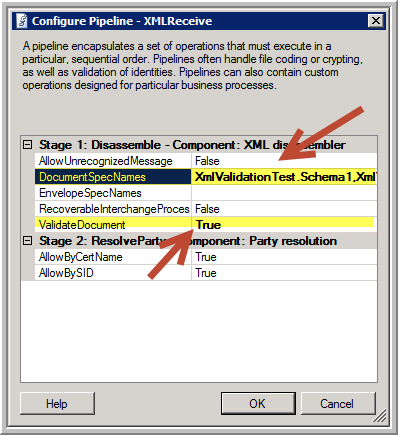
Because of a compressed time schedule, we wanted to avoid having to add a new custom pipeline to the solution, even one as simple as containing a standard XmlValidator component. So instead, I opted to use port-based configuration by enabling validation within the XmlDissembler component in the existing XmlReceive pipeline. Of course, this does require specifying the list of specific schemas in the DocumentSpecNames property on the port instance:

SchemaValidation-Settings

The trick here, of course, is to ensure you get these specifications correct, as they need to be fully qualified assembly (FQN) references. Moreover, if you are expecting multiple message types, you need to separate the entries with a pipeline (“|”) delimiter, something not so obvious if you don’t read the Microsoft documentation. Even less obvious is how to deal with multipart schemas that contain multiple root nodes (at least this blog post sheds some light there).

Read more of this post

GOTCHA: Changing the Namespace on an Envelope Schema

Today I had to change the target namespace for an envelope schema to resolve a conflict that caused XML validation issues in the pipeline. I also had a few other changes to make and for various reasons I did not use the BizTalk Schema Editor tool, but instead opened the schema in the standard Visual Studio XML(Text) Editor mode.

After having dutifully made the change, tested all the maps, ensured the project compiled properly, and successfully run all the unit tests, I deployed the solution.

However, the first integration test failed because on receipt of the message with a pipeline error similar to this one:

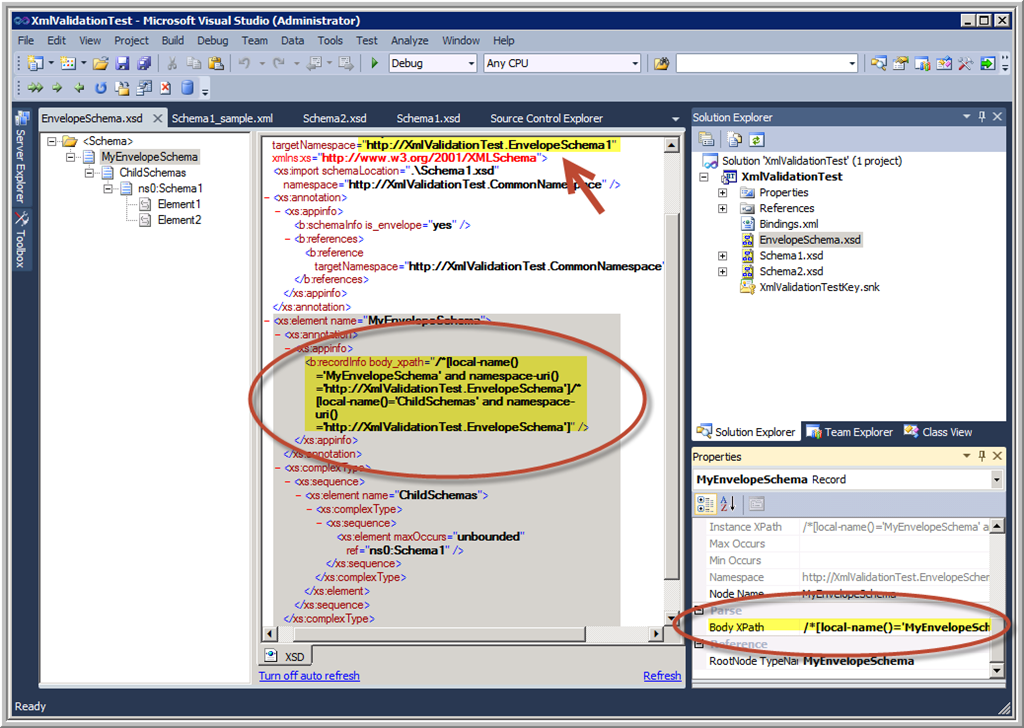
There was a failure executing the receive pipeline: “Microsoft.BizTalk.DefaultPipelines.XMLReceive, Microsoft.BizTalk.DefaultPipelines, Version=3.0.1.0, Culture=neutral, PublicKeyToken=31bf3856ad364e35” Source: “XML disassembler” Receive Port: “XmlValidationReceivePort” URI: “C:\BizTalk\Folders\XML_VAL_IN\*.xml” Reason: This Disassembler cannot retrieve body nodes using this XPath: “/*[local-name()=’MyEnvelopeSchema’ and namespace-uri()=’http://XmlValidationTest.EnvelopeSchema’%5D/*%5Blocal-name()=’ChildSchemas’ and namespace-uri()=’http://XmlValidationTest.EnvelopeSchema’%5D”.
/*[local-name()=’MyEnvelopeSchema’ and namespace-uri()=’http://XmlValidationTest.EnvelopeSchema’%5D/*%5Blocal-name()=’ChildSchemas’ and namespace-uri()=’http://XmlValidationTest.EnvelopeSchema’%5D

Only then did I realise that in updating the target namespace of the schema, I forgot to update the BodyXPath value – which of course has the namespace all through it!

EnvelopeSchema-BodyXPath

Solution is to refresh the BodyXPath property by clicking the ellipses (…) button on the property grid and reselecting the node just above the repeating node you want to debatch:

EnvelopeSchema-Debatch

The good news is that when you use the Schema Editor to change the target namespace, this synchronisation is taken care of for you automatically. And if fact, you cannot change the BodyXPath property by typing in the property grid – you have to open the Body XPath dialog as shown above.

Moral of the story is: beware of circumventing the built-in editors and tools unless you are really, really careful. The tools are usually designed to help keep you out of trouble. 😉

Message Tracking in Windows Azure BizTalk Services

Tonight I was presenting on Windows  Azure BizTalk Services (WABS) to the Brisbane Azure User Group, and someone asked me where you configure message tracking. It was one of those embarrassing moments where you know you saw the feature somewhere, but can’t remember exactly where… hence this blog post.

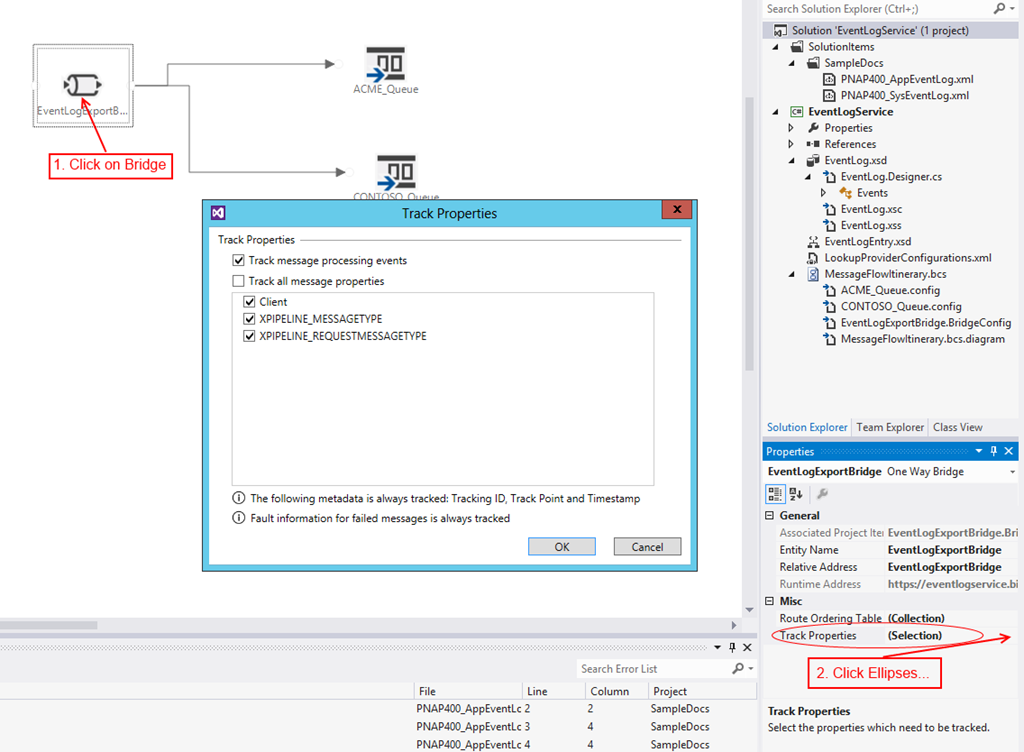
All messages go through a bridge in WABS, which is created on a design surface in Visual Studio (assuming you have installed the Windows Azure BizTalk Services SDK, that is). It is a property on this bridge element which eluded me tonight, although I don’t know how since it is pretty clearly marked:

TrackProperties_markup

Simply select the bridge element, then click the ellipses (…) button next to the Track Properties property to open the (…. you guessed it!….) Track Properties dialog box. There you can select any properties that you have promoted in an Enrich stage of the pipeline, as well as the default XPIPELINE_MESSAGETYPE and XPIPELINE_REQUESTMESSAGETYPE properties.

It should be noted that certain properties are tracked by default, regardless of whether you select anything here at all:

  • pipeline state
  • stage state
  • whether the route destinations are successfully ascertained
  • the activity state for any message processing faults

You then have the ability to view & search on tracked message data in the BizTalk Services Portal:

TrackingPortal

Note that to get to this portal, you need to:

  1. Log into the Azure Management Portal
  2. Click on BizTalk Services on the left (just below Service Bus)
  3. Click on the Manage button at the bottom of the screen

(The first time you access this portal, you may need to enter the Issuer Name & Issuer Key with which you deployed your application, from the ACS namespace you created to associate with the BizTalk Service.)

More information about tracking can be found here on MSDN.

John Glisson - Geek of the Cloth

Thoughts on integration, technology and what-not...

Prashant BizTalk And Azure Integration Blogs

My Integration Experiences - BizTalk And Azure Integration

The CRUCIBLE

THINK: It's not illegal....yet.....

Architecture for cloud and integration

Abdul Rafay's experiences with software architecture, integration, cloud and things around it.

BizTalk musings

Issues, patterns and useful tips for BizTalk development

EAI Guy.net

Enterprise Applicaiton Integration and SOA 2.0

Connected Pawns

Mainly BizTalk & Little Chess

Adventures inside the Message Box

BizTalk, Azure, and other tools in the Microsoft stack - Johann Cooper

Biz(Talk)2

Talk, talk and more talk about BizTalk

Richard Seroter's Architecture Musings

Blog Featuring Links, Code, Thoughts, and Experiences with Software, AI, and Cloud Services

Sandro Pereira BizTalk Blog

My notes about BizTalk Server 2004, 2006, 2006 R2, 2009, 2010, 2013 and now also Windows Azure BizTalk Services.

Mind Over Messaging

Musings on BizTalk, Azure, and Enterprise Integration

WordPress.com News

The latest news on WordPress.com and the WordPress community.