Building a Complete RAG Application in Azure with No Code

Retrieval-Augmented Generation (RAG) is a hot item in the AI world right now as organisations are finding it a useful pattern for building LLM-based chat applications against an easily updateable knowledge store, without the expense of re-training the LLM. The pattern provides a base for AI generated responses that are as reliable, context-bounded, and current as the data in the knowledge store (which can be as simple as a collection of documents). Even better, RAG provides a means for the LLM to respond with citations so you can be confident of where the answer is sourced from:
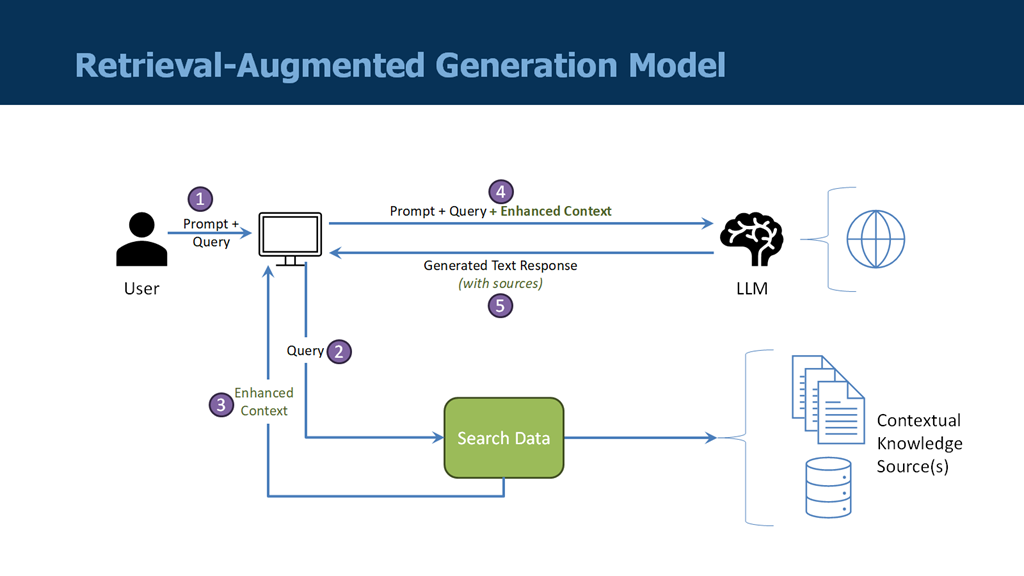
image

Two things are critical to making a RAG application possible:

    • Reliable and high-quality components (especially the LLM and the search capability over the knowledge store)
    • Carefully constructed workflow solutions for handling both the ingestion of data and the chat interface
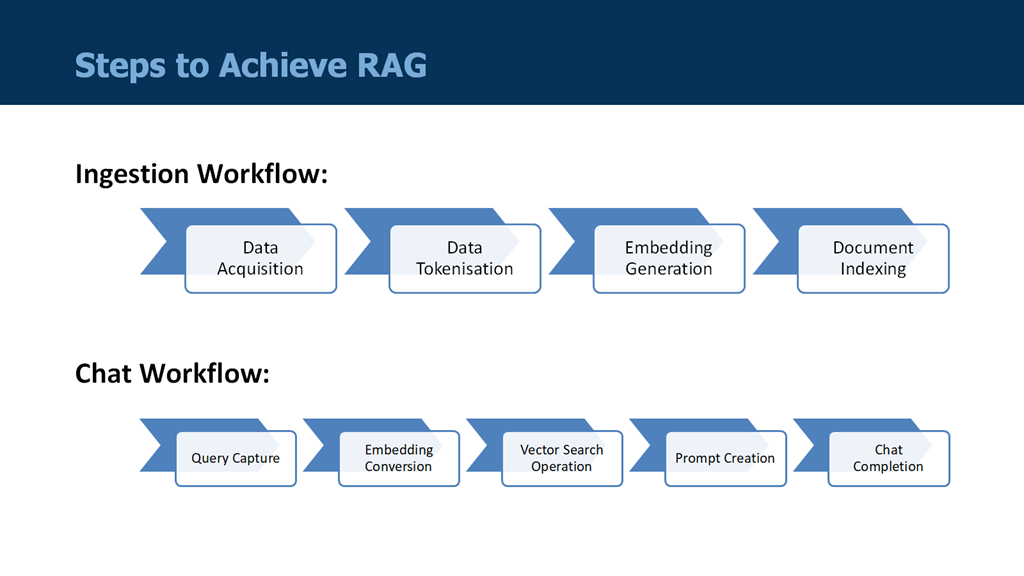
image

Both of these requirements can be met using Microsoft Azure services – and best of all, with no coding required!

As for the ingestion workflow, Stephen W. Thomas already has provided an excellent video guide for building this using Azure OpenAI, Azure AI Search, and Azure Logic Apps. He takes you through the process step-by-step, including the provisioning of all the necessary services and the permissions required.
image

Because Stephen’s guide is so thorough, I don’t need to repeat any of it here. However, the video does not cover how to build the chat workflow, which is worth a discussion – especially because I found a couple of potential traps with the Microsoft provided template.
Building the Chat Workflow

Read more of this post

Copilot for Azure Logic Apps Standard

Those who live in the code-based world have long been enjoying the option to utilise the generative AI assistance via GitHub Copilot.  Powered by OpenAI and Microsoft, Copilot provides invaluable context-based suggestions for completing code patterns based on training from open source code repositories.

Until recently, there was no such assistance available for integration developers who preferred the low-code approach of Logic Apps Standard (although Sandro Pereira has produced a useful utility for Logic Apps Consumption). Given the large number of Logic App connectors available and the inherent complexity in designing integration patterns, a “Copilot” functionality would be especially useful for creating and documenting workflows.

Thankfully, Microsoft is now taking great strides in introducing Azure OpenAI to the Logic Apps development space. In mid-November last year, Microsoft revealed a public preview offering of the Workflow Assistant, a chat interface powered by Azure OpenAI and ChatGPT that can offer context-based suggestions for your workflows that Copilot does for Azure Functions, for instance.  Although currently only available in the Azure Portal (not Visual Studio Code just yet), the assistant can perform many useful functions such as:

  • Suggest which connectors to use in a given scenario and how to configure them
  • Describe how to implement a proven pattern to solve a particular problem
  • Describe an existing workflow giving a detailed report of what it does

What’s more, the responses are determined by the workflow currently open and therefore reflect the relevant context. This is an extraordinary help to those who are not necessarily that familiar with all of Logic Apps capabilities.

Read more of this post

New Dev SKU for Azure Integration Service Environment (ISE)

Last week, Microsoft responded to numerous requests from the community by announcing a new developer tier offering for Integration Service Environments (ISE). The ISE has been generally available for several weeks, but the single available SKU prior to this announcement carried a hefty price tag.

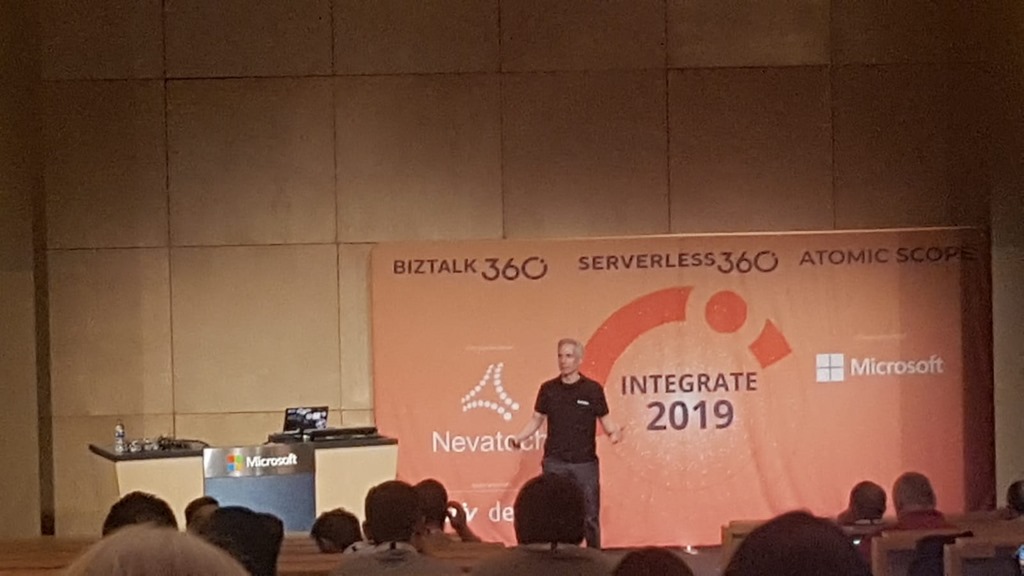
(fromEldert)WhatsApp Image 2019-06-27 at 10.59.51 AMI had the great honour and privilege of speaking about ISE at the INTEGRATE 2019 conference at Microsoft headquarters in Redmond, WA (USA) last month.  My topic was Four Scenarios for Using an Integration Service Environment, which attempted to shed some light on what type of situations would justify using this flat-cost product as opposed to the consumption-based serverless offering of Logic Apps.

While this presentation hopefully piqued interest in the offering, one of the burning questions from the attendees was “When will a lower cost developer SKU be available so we can try it out?”  All Microsoft was able to say at that point was, “Soon.”  Well, at least they were right, as it is now available only a few weeks later!

Read more of this post

2nd Annual Global Integration Bootcamp a Success!

DZLx-R1UQAEhxvOLast Saturday I had the great privilege of organising and hosting the 2nd annual Global Integration Bootcamp in Brisbane. This was a free event hosted by 15 communities around the globe, including four in Australia and one in New Zealand!

It’s a lot of work to put on these events, but it’s worth it when you see a whole bunch of dedicated professionals give up part of their weekend because they are enthusiastic to learn about Microsoft’s awesome integration capabilities.

The day’s agenda concentrated on Integration Platform as a Service (iPaaS) offerings in Microsoft Azure. It was a packed schedule with both presentations and hands-on labs:

Time Slot Topic Speaker
08:30 – 08:45 Arrival & Check-In  
08:45 – 09:00 Introduction & Welcome Dan Toomey
09:00 – 09:45 Serverless Computing with Logic Apps, Functions & Event Grid Dan Toomey
09:45 – 10:45 Building a Smart Solution with Azure Storage, Event Grid, Functions, Logic Apps & the Computer Vision API (Hands-On Lab)
10:45  – 11:30 Microsoft Flow, LUIS and Bots Susie Moore, Dan Toomey
11:30 – 13:00 Creating a Smart Expense Claims Bot using Flow & Bizzy (Hands-On Lab)
13:00 – 13:30 Cognitive Services Adam Finster
13:30 – 15:00 Recognising People  with Cognitive Services Face API (Hands-On Lab)
15:00 – 15:30 Azure API Management Dan Toomey
15:30 – 16:30 API Management Tutorials (Hands-On Lab)
16:30 – 17:00 Integration Design Lee Simpson

It wasn’t all work… we had some delicious morning tea, lunch and afternoon tea catered by Artisan’s Café & Catering, and there was a bit of swag to give away as well thanks to Microsoft and also Mexia (who generously sponsored the event).

0a4f5bc5-e350-401a-b98d-a26c7cd6a502-originalOverall, feedback was good and most attendees were appreciative of what they learned. The slide decks for most of the presentations are available online and linked above, and the labs are available here if you would like to have a go.

I’d like to thank my colleagues Susie, Lee and Adam for stepping up into the speaker slots and giving me a couple of much needed breaks! I’d also like to thank Joern Staby for helping out with the lab proctoring and also writing an excellent post-event article

Finally, I be remiss in not mentioning the global sponsors who were responsible for getting this world-wide event off of the ground and providing the lab materials:

  • Martin Abbott
  • Glenn Colpaert
  • Steef-Jan Wiggers
  • Tomasso Groenendijk
  • Eldert Grootenboer
  • Sven Van den brande
  • Gijs in ‘t Veld
  • Rob Fox

Really looking forward to next year’s event!

Serverless Logging & Alerting with Service Fabric & Azure Event Grid

(This post was originally published on Mexia’s blog on 1st September 2017)

Microsoft recently released the public preview of Azure Event Grid – a hyper-scalable serverless platform for routing events with intelligent filtering. No more polling for events – Event Grid is a reactive programming platform for pushing events out to interested subscribers. This is an extremely significant innovation, for as veteran MVP Steef-Jan Wiggers points out in his blog post, it completes the existing serverless messaging capability in Azure:

  • Azure Functions – Serverless compute
  • Logic Apps – Serverless connectivity and workflows
  • Service Bus – Serverless messaging
  • Event Grid – Serverless Events

And as Tord Glad Nordahl says in his post From chaos to control in Azure, “With dynamic scale and consistent performance Azure Event grid lets you focus on your app logic rather than the infrastructure around it."

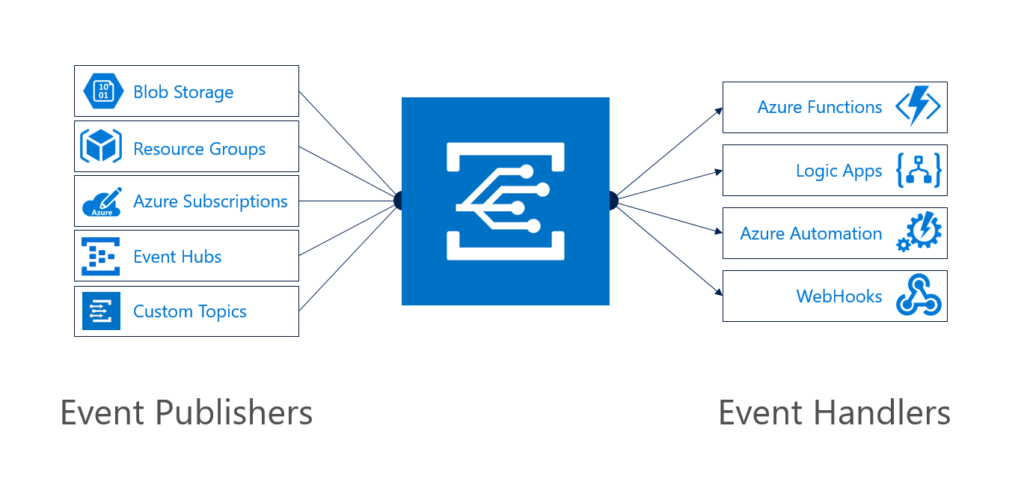
The preview version not only comes with several supported publishers and subscribers out of the box, but also supports customer publishers and (via WebHooks) custom subscribers:

EventGridPubsSubs

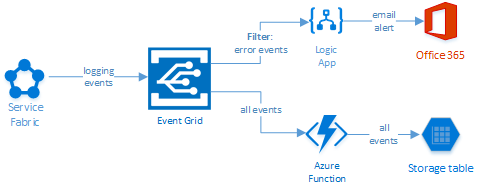
In this blog post, I’ll describe the experience in building a sample logging mechanism for a service hosted in Azure Service Fabric. The solution not only logs all events to table storage, but also sends alert emails for any error events:

image

Read more of this post

John Glisson - Geek of the Cloth

Thoughts on integration, technology and what-not...

Prashant BizTalk And Azure Integration Blogs

My Integration Experiences - BizTalk And Azure Integration

The CRUCIBLE

THINK: It's not illegal....yet.....

Architecture for cloud and integration

Abdul Rafay's experiences with software architecture, integration, cloud and things around it.

BizTalk musings

Issues, patterns and useful tips for BizTalk development

EAI Guy.net

Enterprise Applicaiton Integration and SOA 2.0

Connected Pawns

Mainly BizTalk & Little Chess

Adventures inside the Message Box

BizTalk, Azure, and other tools in the Microsoft stack - Johann Cooper

Biz(Talk)2

Talk, talk and more talk about BizTalk

Richard Seroter's Architecture Musings

Blog Featuring Links, Code, Thoughts, and Experiences with Software, AI, and Cloud Services

Sandro Pereira BizTalk Blog

My notes about BizTalk Server 2004, 2006, 2006 R2, 2009, 2010, 2013 and now also Windows Azure BizTalk Services.

Mind Over Messaging

Musings on BizTalk, Azure, and Enterprise Integration

WordPress.com News

The latest news on WordPress.com and the WordPress community.