User Group Presentation on Hybrid Connections

Last week I had the privilege to present on Hybrid Connections at the Brisbane Azure User Group meeting. It was well attended and the community responded very enthusiastically to the ease at which this technology enables you to connect Azure Web Sites and Mobile Services to on-premises resources behind your corporate firewall. One attendee was so excited by the feature that he stayed back after the meeting with his laptop and proceeded to deploy his web site application to Azure right there on the spot, hooking it up in minutes to his on-premises database!
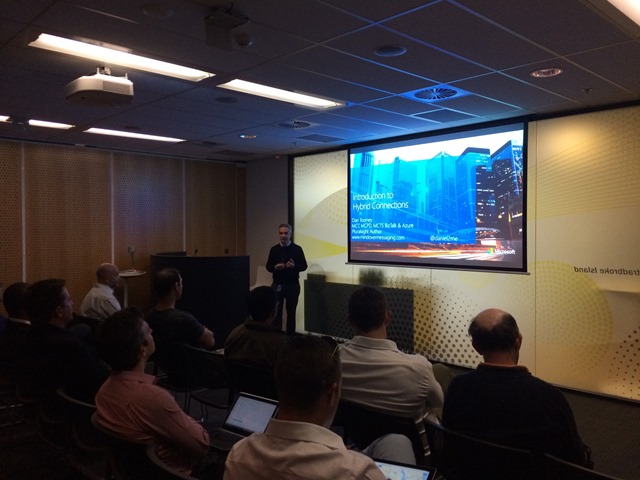
highres_399395482 I’d like to express my gratitude to Santosh Chandwani, a Microsoft Azure Sr. Program Manager who shared his slide deck with me and gave some very helpful tips in preparing my demo. The slides are available on SlideShare if you wish to view the presentation as I presented it, or you can download the original version that Santosh presented at Tech Ed USA.

Santosh also promptly answered some questions raised by the community which I posted on the Azure Advisors Yammer group:

Q: Seems expensive to get more than 5 HC connections?
A: “If there are specific Dev-Test scenarios where the 5 Free HC don’t suffice, please let us know.”

Q: What are the performance/load specifications? Any guidance on where potential bottlenecks may be, and/or best practice guidelines?
A: “In general, the throughput you can achieve with HC is constrained by the internet connectivity between the on-prem network and Azure. Since this is part of the user’s network infrastructure, it is hard for us to provide a specific throughput baseline.
We recommend users assess the throughput that each instance of the on-prem Hybrid Connection Manager provides on their network. Adding more instances may provide higher throughput (again depending on the network infrastructure). Also, for production scenarios, at least 2 instances are recommended for resiliency. ”

Stay tuned for an upcoming webcast about this on the BrizTalk YouTube Channel!

UPDATE: Webcast published!! View it here.

The exception message is: A base address with the uri scheme ‘net.pipe’ needs to be specified if using service management endpoint ‘ServiceManagementNetPipeEndpoint’

This post was extremely useful today while troubleshooting an AppFabric error with Service Bus Relays (“System.ServiceModel.ServiceActivationException: The service ‘/MyServices/MyService.svc’ cannot be activated due to an exception during compilation. The exception message is: A base address with the uri scheme ‘net.pipe’ needs to be specified if using service management endpoint ‘ServiceManagementNetPipeEndpoint’.”) There have been many other posts about this topic, but this is the first one I found that revealed the critical last step of checking the net.pipe binding on the website level (not just the application level)! Well done, Sajid!!

Sajid's avatarThe Code Authors

AppFabric uses this magically generated service endpoint when we configure the services to start automatically.

Problem
System.ServiceModel.ServiceActivationException: The service ” cannot be activated due to an exception during compilation. The exception message is: A base address with the uri scheme ‘net.pipe’ needs to be specified if using service management endpoint ‘ServiceManagementNetPipeEndpoint’. Verify a base address exists on the site and the protocol is enabled on the application.. —> System.Configuration.ConfigurationErrorsException: A base address with the uri scheme ‘net.pipe’ needs to be specified if using service management endpoint ‘ServiceManagementNetPipeEndpoint’. Verify a base address exists on the site and the protocol is enabled on the application.

Solution.
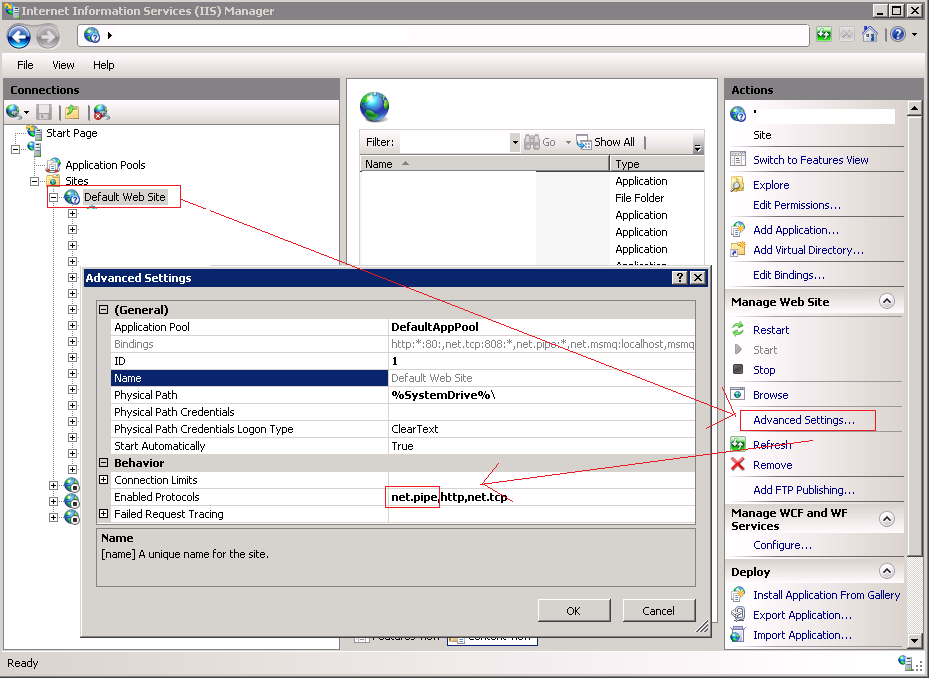
Under the advanced settings of the service make sure net.pipe configured as one of the enabled protocols.

appfabricnetpipeerror1

Still see the same error??

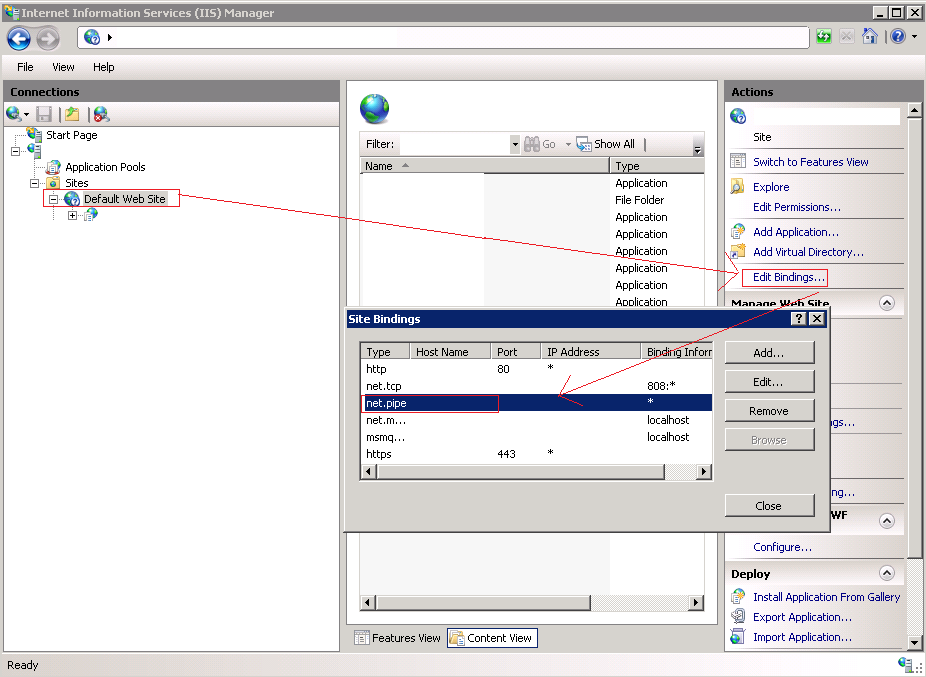
Check if the website has this binding enabled.

appfabricnetpipeerror2

And verify this binding is enabled as protocol on website level.

appfabricnetpipeerror3

View original post

Mapping a Newline within a String

Today a colleague asked me how best to insert newlines into a concatenated set of address lines within a map. It struck me that despite spending eleven years as a BizTalk developer, creating hundreds if not thousands of maps,  and even authoring a Pluralsight course on the Mapper,  I’ve never actually attempted something as simple as inserting a newline into a string output!

Like most programmers with C# .NET experience, the first instinct was to try inserting “\n” or “\r\n” into the string. But of course that wouldn’t work – the output of a non-scripted mapper link is XSLT, not .NET code.

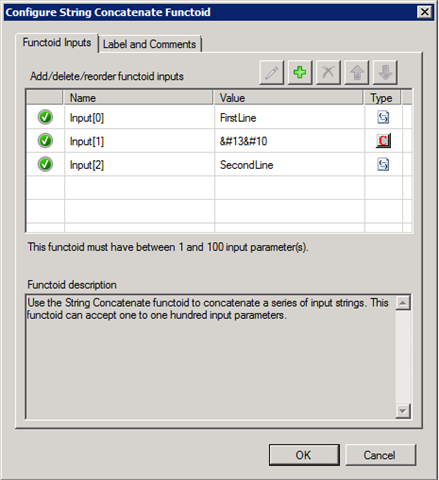
So that leads to the assumption that an XML entity character is required; surely that will work? Since the string “&#13&#10” is the XML entity representation of a carriage return followed by a line feed (CR LF), we should be able to just insert that as a constant parameter within the String Concatenate functoid:

01

But then it becomes evident that the mapper escapes all characters that might otherwise be unintentionally interpreted as markup:

02

Hmmm… not turning out to be as easy as we thought. Surely we don’t need to resort to inline XSLT just to insert a newline into text?

Read more of this post

Using Azure Hybrid Connections to Consume an On-Premises WCF Service from the Cloud

Microsoft introduced Hybrid Connections a few weeks ago, a [currently] free version of BizTalk Services that allows you to seamlessly connect Web Sites and Mobile Services hosted in Azure to LOB systems residing within your organisation’s network. Similar to Service Bus Relays, there is no need to open inbound firewall ports as a locally installed agent can establish the connection to Azure from within your network. To help support this feature, Microsoft also introduced a free tier of BizTalk Services specifically to accommodate Hybrid Connections.

The most obvious question asked by most is, “Will this replace Service Bus Relays?”.  After all, they do seem very similar in concept. Michael Stephenson wrote an excellent blog post addressing this very question and identifying the key differences as well as the situations you would most likely choose one technology over the other.

What has sparked my post here is that the only examples I found highlighting this new feature were aimed at connecting to on-premises databases. While this is certainly impressive and useful (especially since your Azure Web Site can use the exact same connection string you would use for on-premises access!), it left me wondering how Hybrid Connections could be used to expose WCF Services within an internal network – without the need for configuring relay bindings.  My interest in this capability has arisen from some recent experiences building hybrid solutions for our clients:

Read more of this post

Service Bus Queue/Topic Partitioning Not Supported in BizTalk Services

The other day my esteemed colleague Bill Chesnut & I were configuring EDI agreements for a client using Microsoft Azure BizTalk Services (MABS). Because we were testing in an isolated development environment, we redirected the actual vendor routing to some Service Bus queues that we created so that we could inspect the messages.

The solution was already routing some messages to pre-existing queues (e.g. for suspended messages) and they were all working just fine. However all messages bound for the new queues we set up were failing with this error message in the tracking database:

This client is not supported for a partitioned entity. The client version should be greater or equal than version ‘2013-10’..58ca562e-49ef-4c92-823d-1a219c3f52bd_G8

This is odd… the new queues were created the same way as the existing ones were, using the “Quick Create” method in the Azure Management Portal. So what was different?

Thankfully it was Bill who remembered a relatively new feature in Service Bus – the addition of partitioned entities for increasing throughput by employing multiple message brokers and stores, introduced late last year. You can find out more details about how this works here.

Read more of this post

BizTalk Services – EDI Agreement Deployment Errors

This week I’ve been frustrated by “unknown exception” errors whilst trying to deploy an X12 EDI agreement to Windows Azure BizTalk Services. The generic message was of course extremely helpful in isolating the problem:

WABS_AgreementDeploymentError

(“Error: An error occurred while deploying the agreement. Details: Service encountered an unknown exception..”)

It happened that a recent tweet by Microsoft MVP Sam Vanhoutte proved that I wasn’t alone in my angst, as did this entry on the MSDN Azure forum. Unlike SGSJWS however, switching browsers didn’t solve my issue. Sam’s helpful advice to check all configuration items, however, did eventually lead me to closer inspection where I discovered the cause.

Read more of this post

First Pluralsight Course Published!

PluralsightIn case anyone is wondering why I’ve been out of the blogging and social media scene for the past few months, it’s because I’ve had my head down trying to complete the authoring of my first Pluralsight course!

Well, I’m pleased to say that the course is now live!! It’s been a long journey and resulted in three scope changes, but is finally published. Also feel very privileged to have joined the ranks of the Pluralsight author team, comprised of so many exceptional people whose wisdom I’ve been following throughout my career.

The course is entitled Using Functoids in BizTalk Server 2013, and it features a deep-dive exploration of the eighty built-in functoids within the BizTalk Mapper toolbox, as well a brief look at creating custom functoids and hosting custom XSLT files. Despite the title, it is equally relevant to BizTalk Server 2010 users as the Mapper has not changed much between those two versions. (Come to think of it, the functoids themselves haven’t changed all that much since BTS 2006, even though the user interface was overhauled to great improvement in 2010.)

Read more of this post

BizTalk HTTP receive IIS Internal Server 500 Error

A very helpful post that got me out of trouble today! The constant HTTP 500 error responses aren’t very helpful…

BizTalk Integration Summit 2013 (USA) – BizTalk is Alive & Well!

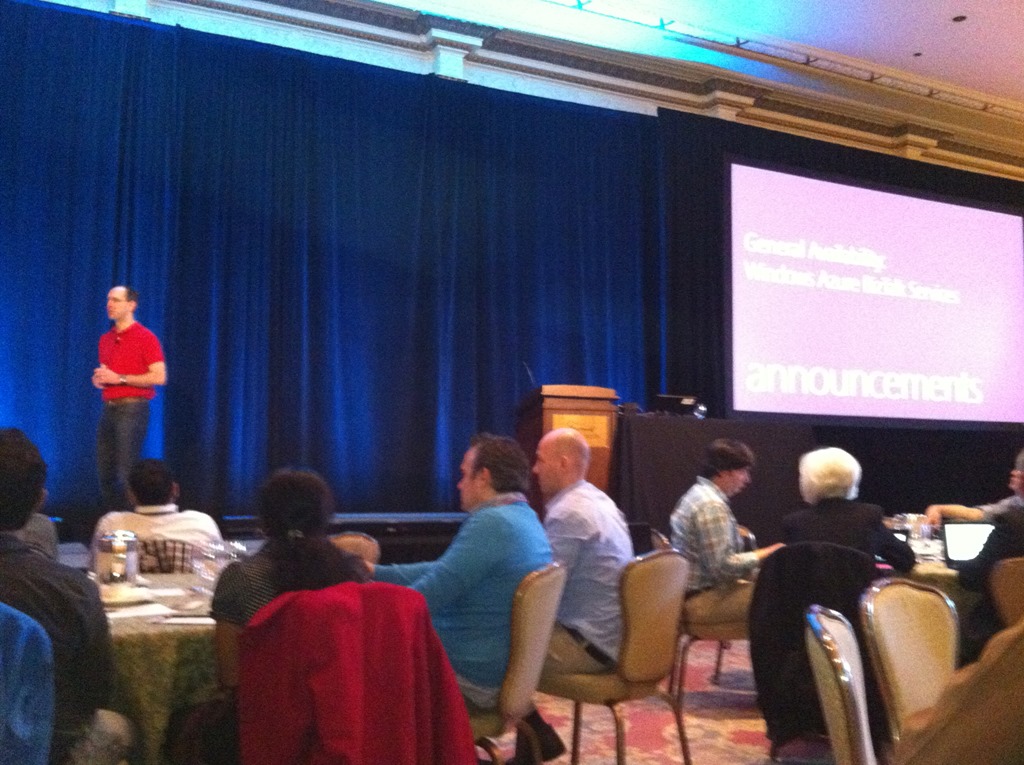
Just enjoyed an awesome experience at the BizTalk Integration Summit in Seattle with my esteemed colleagues Bill Chesnut and Dean Robertson! Not only did I have the opportunity to meet most of the top BizTalk experts in the world for the first time (including Sandro Pereira, Tord Glad Nordalh, Steef-Jan Wiggers, Saravana Kumar, Richard SeroterKent Weare, Michael Stephenson, Stephen Thomas, Jon Fancey and others), but we were there to hear Scott Guthrie personally announce the General Availability of Windows Azure BizTalk Services (WABS) just minutes before the news went public:

IMG_1663

Read more of this post

BizTalk SQL Agent Jobs – Configuration Errors

In a previous post, I talked about how to configure the BizTalk SQL Agent jobs responsible for backing up the databases and purging the tracking data. These jobs are not configured by default, but their operation is essential for keeping your BizTalk system running smoothly.

Today, I inherited a developer VM at a new client with a warning that it was “running a bit slow…”.  Upon investigation, I discovered that the Backup BizTalk Server job had not been configured, so I promptly set about doing that task. However, I uncovered an error once I tried to run the job the first time:

Executed as user: NT AUTHORITY\SYSTEM. The statement BACKUP LOG is not allowed while the recovery model is SIMPLE. Use BACKUP DATABASE or change the recovery model using ALTER DATABASE. [SQLSTATE 42000] (Error 4208)  BACKUP LOG is terminating abnormally. [SQLSTATE 42000] (Error 3013).  The step failed.

Read more of this post

John Glisson - Geek of the Cloth

Thoughts on integration, technology and what-not...

Prashant BizTalk And Azure Integration Blogs

My Integration Experiences - BizTalk And Azure Integration

The CRUCIBLE

THINK: It's not illegal....yet.....

Architecture for cloud and integration

Abdul Rafay's experiences with software architecture, integration, cloud and things around it.

BizTalk musings

Issues, patterns and useful tips for BizTalk development

EAI Guy.net

Enterprise Applicaiton Integration and SOA 2.0

Connected Pawns

Mainly BizTalk & Little Chess

Adventures inside the Message Box

BizTalk, Azure, and other tools in the Microsoft stack - Johann Cooper

Biz(Talk)2

Talk, talk and more talk about BizTalk

Richard Seroter's Architecture Musings

Blog Featuring Links, Code, Thoughts, and Experiences with Software, AI, and Cloud Services

Sandro Pereira BizTalk Blog

My notes about BizTalk Server 2004, 2006, 2006 R2, 2009, 2010, 2013 and now also Windows Azure BizTalk Services.

Mind Over Messaging

Musings on BizTalk, Azure, and Enterprise Integration

WordPress.com News

The latest news on WordPress.com and the WordPress community.